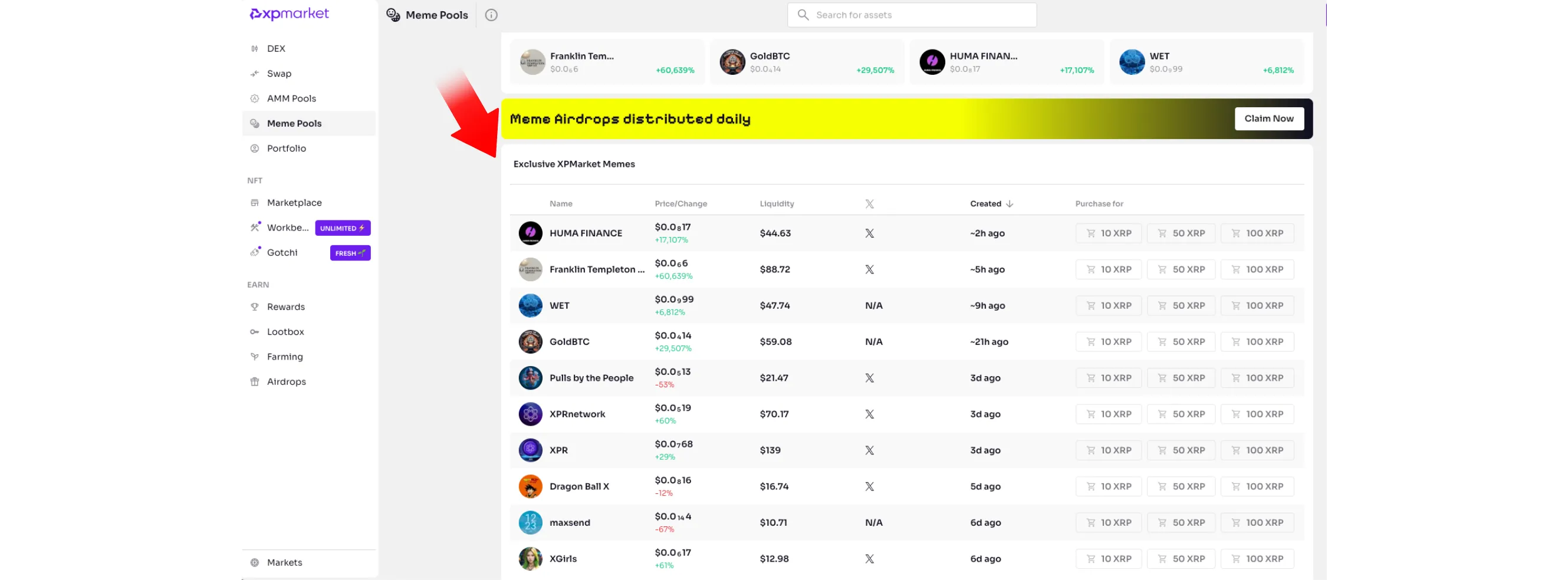
Explore meme tokens on XPMarket with no wallet needed: track prices, liquidity, launches, and full token activity through the Meme Pools dashboard in just a few simple steps.
How to Explore Meme Pools on XPMarket
Meme tokens are a big part of the XRP Ledger community, and XPMarket gives you a simple way to explore them all in one place. Their Meme Pools page shows new and trending meme coins, daily price changes, liquidity, and activity — all without needing a wallet or any funds.
Here’s how to explore meme tokens on XPMarket in a few simple steps.
Step 1: Open XPMarket
Go to xpmarket.com
You’ll land on the homepage with market stats and trending tokens.
Step 2: Open the Meme Pools Section
On the left sidebar, scroll until you see the Meme Pools option under the EARN category.
Click it to open the dedicated list of meme coins on XPMarket.
Step 3: Browse the Meme Token List
You’ll now see a clean table showing:
Token name and icon
Price and 24h change
Liquidity
When the token was created
Quick-buy options (optional, not required)
This gives you a fast overview of which meme tokens are trending or newly launched.
Click any token from the list to view deeper details.
You’ll see:
Live price chart
Market stats
Orderbook
Recent trades
Holders and trustlines
24h trading volume
Wallet activity
Step 5: Review Activity and History
Scroll down to check:
Exchange history
Open orders
Trade history
This helps you understand whether the token is actively traded or quiet.
Conclusion
XPMarket’s Meme Pools make it easy to explore meme tokens on the XRP Ledger in a safe, wallet-free way. You can track price movements, liquidity, new launches, and full token stats with just a few clicks.