
How to Explore XRPL NFT Collections Using Bidds
Explore XRPL NFT collections easily using Bidds: view rankings, floor prices, attributes, and activity for any NFT without connecting a wallet. A simple way to research XRPL’s growing NFT ecosystem.

How to Explore XRPL NFT Collections Using Bidds
Bidds is one of the most active NFT marketplaces on the XRP Ledger, giving you a clear view of top collections, floor prices, volumes, individual NFTs, and holder activity. The interface is simple and allows you to explore XRPL NFTs without connecting a wallet or spending anything.
This quick guide walks you through everything you can do on Bidds using only your browser.
1. Start at the Bidds Homepage
Go to bidds.com and make sure the chain at the top is set to XRPL.
You will immediately see the marketplace’s featured collections at the top, along with their floor prices and burned supply indicators.

Here you can see:
Volume
Floor price
Market cap
Number of holders
Ranking
This gives you an instant snapshot of which XRPL collections are trending.
2. Open Any Collection to Explore It

Floor price
Total supply
Number of owners
Listed percentage
Royalties
Collection statistics and activities
This page gives you a full overview of the project’s health and popularity across the XRPL NFT ecosystem.
If you’re also interested in tracking major network upgrades that may impact NFT ecosystem growth, check out:How to Track New Blockchain Upgrades Across Major Networks Using DeFiLlama
3. Browse Individual NFTs Within the Collection
Scroll down to see all NFTs in the collection.
You can switch between grid views, change sorting options (Low to High, High to Low, etc.), or search for a specific NFT ID.
Clicking on any NFT will open its details page.
4. View NFT Details, Attributes, and Activity
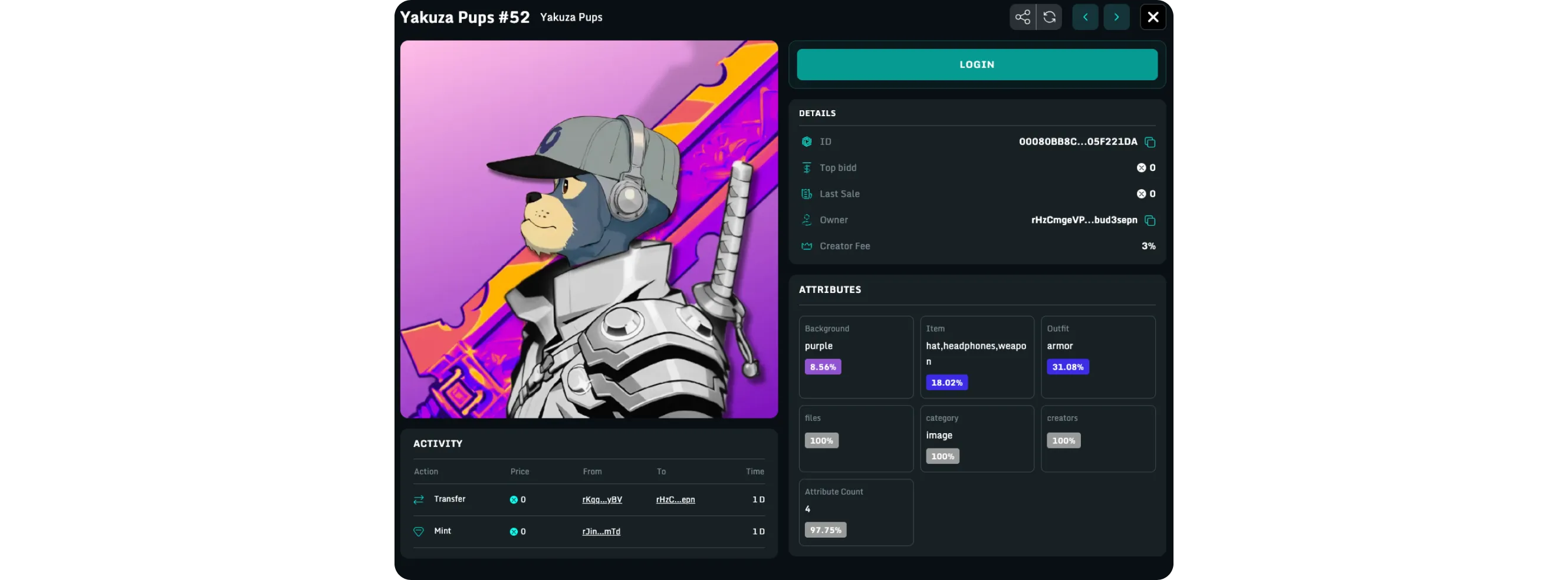
Attributes and rarity percentages
Owner address
Creator fee
Top bid and last sale
Full activity history (mints, transfers, sales)
This is the best place to analyze the rarity and price movement of a single XRPL NFT before deciding whether you want to buy or make an offer.
Bidds also shows you the NFT media, collection link, and metadata so you can confirm authenticity at a glance.
Conclusion
Exploring XRPL NFTs on Bidds is simple, fast, and perfect for researching collections, tracking market activity, and studying individual NFTs. Whether you're checking floor prices or analyzing attributes, the platform gives you all the information in one clean dashboard, without needing a wallet connection.
If you're interested in earning rewards within the XRPL ecosystem, you can also read:XRP Tundra Referral Program, Quick Start Guide