Solscan is a Solana blockchain explorer that lets users track wallet transactions, verify token transfers, and monitor on-chain activity in real-time. Users can search wallet addresses, review transaction details including status and fees, explore token metrics, and use wallet labels to identify accounts and monitor custom addresses
USING SOLSCAN LIKE A PRO: TRACK TRANSACTIONS, TOKENS, AND WALLET LABELS
Solscan is one of the most powerful tools in the Solana ecosystem. It's a blockchain explorer that allows anyone to view real-time on-chain activity, from wallet balances and token transfers to validator data and NFT transactions.
If you use Solana for trading, staking, or DeFi, learning how to use Solscan properly can help you verify transactions instantly, explore wallet histories, and track token activity with precision.
Here's how to use Solscan like a pro.
Step 1: Go to Solscan
Visit solscan.io in your browser
*The homepage displays live statistics like SOL price, total transactions, and network performance
At the top, you'll see a search bar, this is where you can enter wallet addresses, transaction hashes, or token names
Step 2: Track Wallet Transactions
Paste a Solana wallet address (starts with a mix of letters and numbers, no "0x") into the search bar
Press Enter
You'll be taken to that wallet's page, where you can view:
Recent transactions
Token balances (SPL tokens and NFTs)
Total SOL holdings
Each transaction line includes time, type (transfer, swap, stake, etc.), and a clickable transaction hash for deeper details.
Step 3: Review Transaction Details
When you click a specific transaction, Solscan shows a full breakdown, including:
Status: Confirmed or Failed
From / To: Sender and receiver addresses
Amount: How much SOL or which token was transferred
Fee: Transaction cost (in SOL)
Block / Slot: The exact block in which it was confirmed
This helps you verify if your transfers, swaps, or airdrops went through successfully.
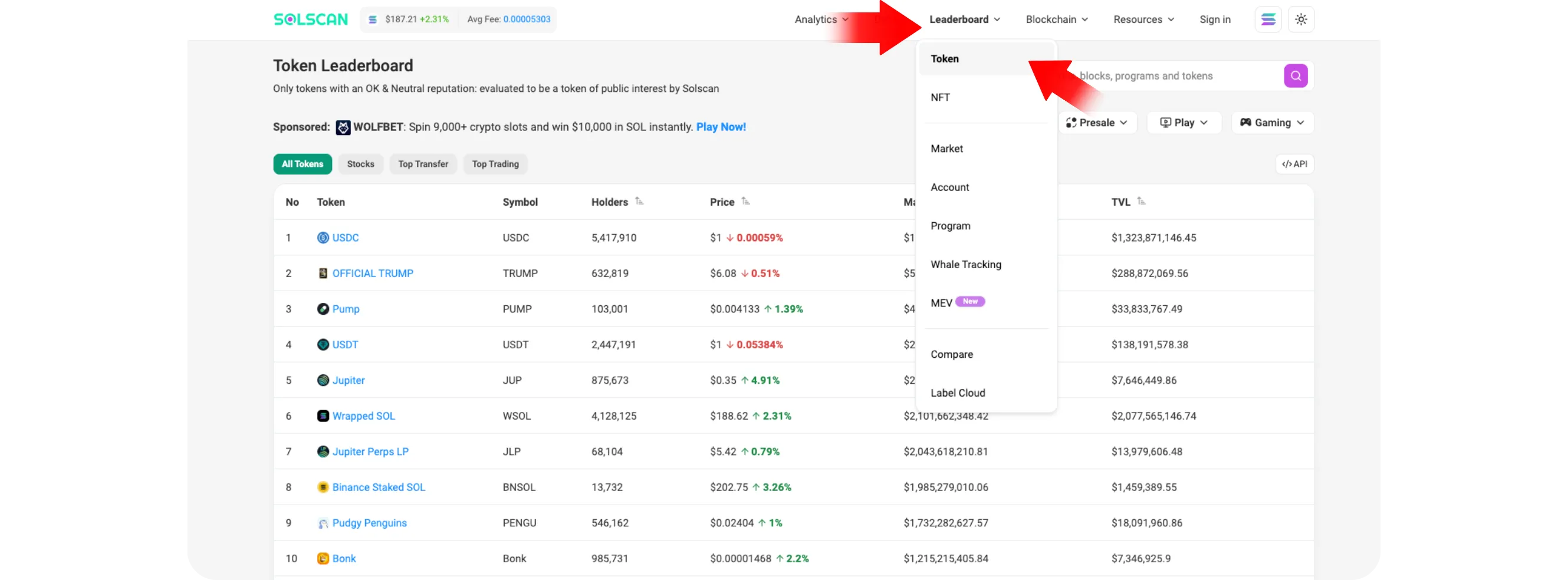
Step 4: Explore Tokens
Solscan isn't just for wallets, you can track tokens too
In the top navigation bar, click "Tokens"
*You'll find:
Trending tokens on Solana
Mint addresses (used to verify authenticity)
Holders count and supply metrics
If you search for a specific token (like USDC, JitoSOL, or a meme coin), Solscan displays its market stats and a list of top holders, a useful tool to spot real projects versus fake ones.
Step 5: Use Wallet Labels
One of Solscan's most underrated features is wallet labeling
Many popular accounts are already labeled, such as exchanges, NFT marketplaces, and verified DeFi protocols
*When you see a label like "Binance Hot Wallet" or "Jupiter Aggregator", it helps you identify who's behind a transaction
If you log in with a Solscan account, you can also add private labels to wallets you monitor, for example, tagging wallets as "My Main Wallet," "Test Wallet," or "Airdrop Address."
Tips for Effective Use
Bookmark your wallet's page for quick access to your transactions
Always verify token mint addresses to avoid scams or fake tokens
Use Solscan's "Analytics" tab to view charts of your wallet's historical balance and activity
You can export wallet data to CSV for recordkeeping or tax reports
Conclusion
Solscan is an essential tool for anyone active in the Solana ecosystem. It gives you full transparency into transactions, tokens, and wallet activities, all in one place. By mastering Solscan's features, you'll be able to confirm transfers instantly, track your assets efficiently, and gain deeper insights into how money moves across Solana.