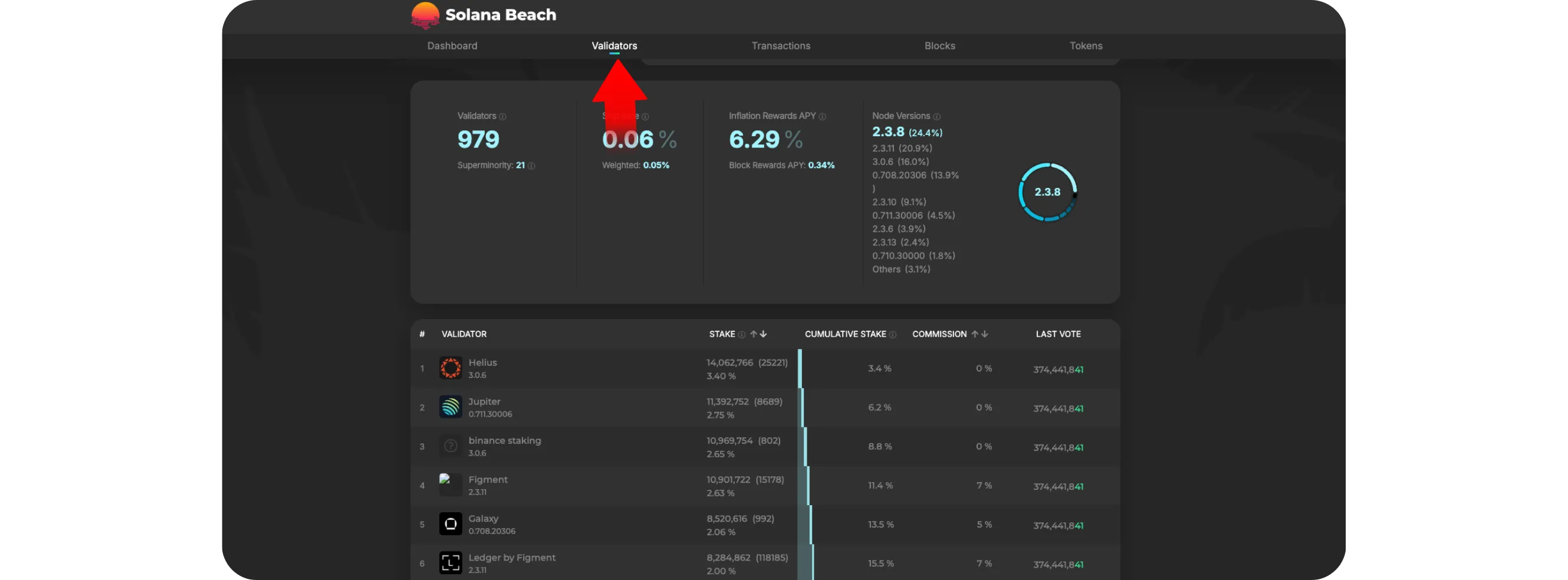
Solana Beach provides real-time analytics on Solana's network performance, validator activity, and software versions. Users can track TPS, block times, epoch progress, and monitor which validators are running new software versions to identify protocol upgrades as they roll out across the network
HOW TO USE SOLANA BEACH TO TRACK SOLANA NETWORK UPGRADES
The Solana network evolves rapidly, with frequent performance upgrades and validator improvements that keep it one of the fastest blockchains in the world. Instead of relying on social media updates, you can monitor Solana's real-time performance and upcoming network upgrades directly from Solana Beach, a public blockchain explorer that visualizes validator activity, block times, and network health.
This guide will show you how to use Solana Beach to stay informed about Solana's network status and protocol updates.
Step 1: Visit Solana Beach
Go to solanabeach.io in your web browser
*Solana Beach provides detailed analytics for validators, staking, epochs, block production, and network versions, all in real time
Step 2: Check the Network Overview
On the homepage, you'll see a summary of key network data, including:
Current Slot and Epoch: Indicates how far along the network is in its block cycle
TPS (Transactions Per Second): Shows how quickly the network is processing transactions
Block Time: Displays average time per block, usually around 400–600 milliseconds
Version: The Solana software version currently running on most validators
These metrics confirm that the network is healthy and operating efficiently.
Step 3: View Validator Activity
Scroll down to the Validator Map or open the Validators tab at the top
You'll see all active validators, their current version, uptime, and stake amount
If you notice many validators running a new version (for example, upgrading from v1.17 to v1.18), it often indicates that a protocol update is being deployed across the network. You can also identify validators still running older versions, useful for tracking the progress of an upgrade rollout.
Step 4: Monitor the Current Epoch and Leader Schedule
Solana upgrades often roll out gradually during new epochs
Track leader schedules, showing which validators are producing blocks
Understanding epochs helps you know when updates might take effect, since many network-level changes activate at epoch boundaries.
Step 5: Compare Network Versions
Click the "Versions" or "Validators" tab to see which Solana release versions validators are running
*If a large percentage are already on a newer version, that usually means a new software update (upgrade) has been released and adopted
This is one of the easiest ways to identify new upgrades before official announcements are widely shared.
Step 6: Stay Updated
For deeper technical details about updates, you can also visit:
status.solana.com: for official network status reports
docs.solana.com: for release notes and validator changelogs
Solana Beach: for real-time confirmation that validators are running the latest software
Tips
Check the average block time and TPS regularly to confirm the network's health
A sudden drop in validator uptime or a mismatch in versions may indicate that an update is in progress
Bookmark Solana Beach to easily monitor upgrades and network performance over time
Conclusion
Solana Beach is one of the best tools for keeping track of Solana's health and upgrades in real time. By checking validator versions, epochs, and performance metrics, you can see exactly when network improvements are being rolled out, all without connecting a wallet or holding any SOL.
Whether you're a validator, developer, or just a curious Solana user, understanding how to read Solana Beach keeps you ahead of every network upgrade.