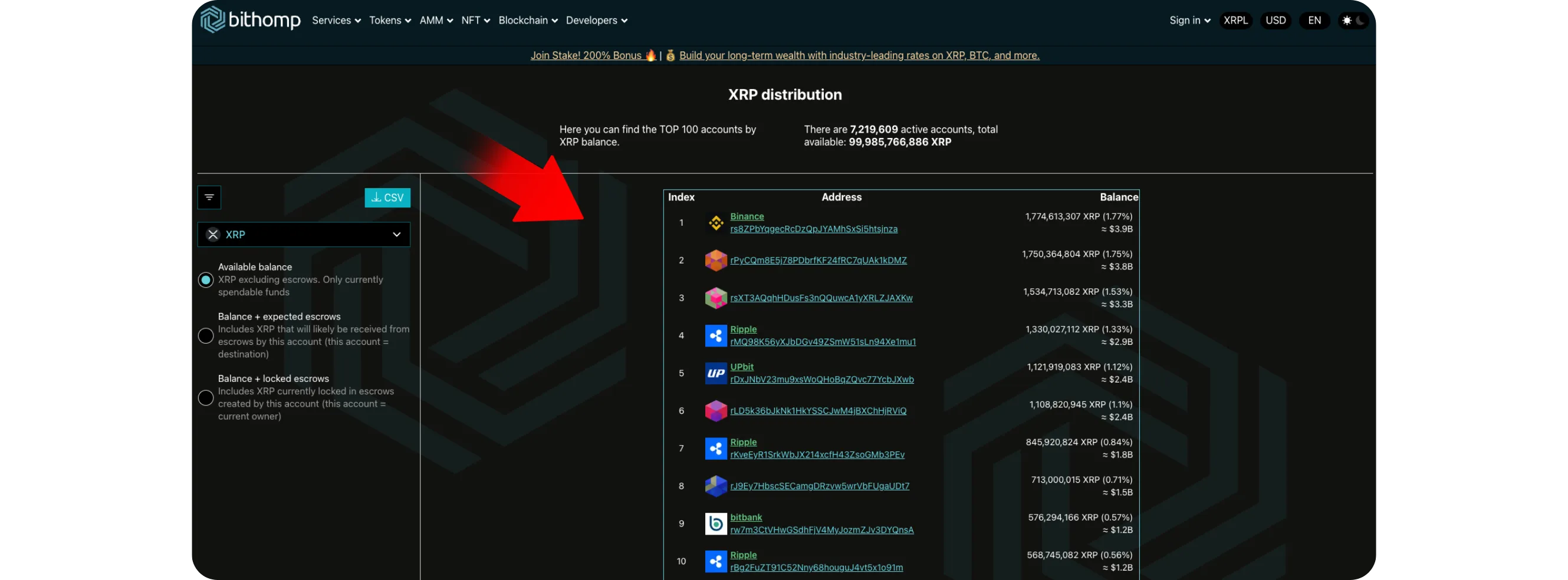
Bithomp's Rich List displays the largest XRP wallets ranked by holdings, showing exchange accounts, institutional wallets, and whale activity. Users can analyze transaction history, account creation dates, verified domains, and movement patterns to track capital flows, exchange liquidity, and long-term holder behavior across the XRP Ledger.
HOW TO VIEW THE RICHEST XRP WALLETS AND THEIR ACTIVITY
Tracking the largest wallets on the XRP Ledger offers valuable insight into how major holders, often called "whales", move funds, interact with exchanges, and impact network liquidity. With tools like Bithomp, users can explore wallet rankings, verify account types, and analyze transaction history, all without connecting a wallet or spending XRP.
Step 1: Visit Bithomp
Go to bithomp.com, one of the most trusted explorers for the XRP Ledger
*It provides detailed wallet analytics, transaction lookups, and tagging for verified accounts
Step 2: Access the "Top Accounts" Section
From the homepage, scroll slightly down or go directly to bithomp.com/rich-list
*This page lists the richest XRP wallets, ranked by total holdings
*You'll see thousands of accounts, including exchanges, institutional wallets, and dormant holders
Step 3: Explore Wallet Details
Click on any wallet address to view a complete breakdown of its on-chain activity:
Total XRP held
Transaction history
Account creation date
Tags identifying exchanges or custodians
Graphs of inflows and outflows
This lets you quickly identify which accounts are active, which are accumulating, and which belong to known entities like Binance or Bitstamp.
Step 4: Analyze Movement Patterns
Scroll through the transaction section to spot trends such as:
Large transfers to exchanges, which often indicate potential selling
Incoming transfers from cold wallets, which might suggest reallocation or staking activity
Low-frequency movements, typical of long-term holders or institutional vaults
To better understand protocol-level decisions that affect all wallets, you can also explore how upgrades shape network operations. For more details, see How to View XRPL Amendments and Upcoming Network Changes, which explains how consensus rules evolve on the XRP Ledger.
Step 5: Use Search and Filters
Bithomp allows users to search specific wallets, tags, or domains
*Typing "Binance," "Bitstamp," or "Ripple" will show you verified organizational accounts
*Helping you track exchange liquidity or company-related activity directly from the ledger
Step 6: Verify Domain and Account Flags
Many wallets display verified domains, an additional layer of trust that confirms authenticity
When viewing any address, check the "Flags" and "Domain" fields to confirm whether the account belongs to a verified service or individual
Conclusion
Exploring the richest XRP wallets gives a deeper look at how capital flows across the network. By observing movements between major wallets and exchanges, users can understand market sentiment and liquidity behavior in real time.
To go further, you can also learn how to simplify transactions using wallet-generated QR codes. See How to Create and Use XRP Payment QR Codes for a step-by-step walkthrough.